Two things: Site change and Obsidian

First, I’m about to start a major rebuilding project related to this site. I will be getting it off WordPress and returning it to a static HTML site. This is because, well, reasons. They’re many and varied.

A couple of them (possibly not the most important) are: security, server resources, comment spam, comments in general, control, I have finally discovered scripting and have created my own little templating system that means I can package a 3000+ page site in seconds and just use Filezilla to upload it.

Comment spam is a pain in the ass but tolerable. I don’t like it but I honestly hardly notice it because all comments are moderated. I delete them every few weeks and that’s that.

So really it comes down to I’m doing it just because I want to. And because as AI becomes more and more capable, WordPress and other dynamic web content becomes less and less secure. I’m not worried about it; I just don’t want to deal with it (if it happens)!

But I accidentally on purpose built a static site setup that is nearly effortless and will let me have absolute control over every page on my site. If I want a page with fourteen columns, I could make it. WordPress might let me, but I’d have to learn block coding and design, and I’m just…tired.

I’m tired of WordPress. I’m tired of SEO (I never use it anyway but still). I’m tired of the web being the way it is now.

I decided a while back, when I realized I really needed to update an older WordPress theme I use on a different site, that I also really needed to learn the WordPress block editor and full site editing, specifically if I want to update that site layout, and I realized I just don’t want to learn it. Just don’t want to.

WordPress is not the blogging platform it used to be. It still runs blogs just fine, but most blogs aren’t really blogs anymore. They’re businesses pretending to be blogs. So I guess WordPress knew where things were heading and adapted accordingly. It is a full fledged CMS and it hasn’t been user friendly for an amateur web developer in a long time.

If you haven’t stayed up to date with every change, getting up to date in one fell swoop feels impossible.

Back in the day, I learned the things I needed to learn to build a theme from scratch in a few days. Now, I’m certain it would take me weeks. If not longer.

I’m just not up for it.

Second—

Ah crap.

I already forgot the second. I shouldn’t have gotten distracted by the WordPress thing.

Let me think.

Oh yeah! Obsidian.

I’ve changed my mind. I started using Obsidian again more heavily a few weeks ago, and this time something must have clicked (or my use cases were just way more suited to it) because I have completely changed my mind about it.

I really couldn’t tell you the difference this time, but I have been discovering some formatting and other options (callouts, extract, outline, code blocks) that make it feel at least as formatted as something I paste into OneNote and more useful by a long shot. In fact, I’ve moved things out of OneNote and I don’t miss it at all.

What really changed things for me was the discovery that I could code little custom scripts for myself using AI (for things I had never gotten around to learning to code before), and I’ve been learning some myself through examples, asking for thorough explanation, and experimenting. I now have a solution to the sync issues. I use a little script on my computer to move files from my Obsidian uploads folder in OneDrive and into Obsidian on my laptop.

It’s not “sync” but it’s darn close to it.

I do have to upload any file I create in Obsidian on my phone to OneDrive. But it creates a kind of built in version control because OneDrive refuses to overwrite files with the same name when I upload something.

I’ve found that for my own workflow, I’m giving up almost nothing to have total control over my documents and all of them in a format that is safe for a long-term archive.

I’m in the middle of coding a custom script set that will turn my raw LibreOffice Writer .odt files into upload ready PDF print books. It’s been a whirlwind of learning and coding that will depend on no service to do.

So I better get back to it. Only a few scenes today to finish writing first. Which brings me to another topic but I’ll save it for another day.

A little hint: I’ve discovered that I’ve been working against my own abilities as a writer, and the discovery has kind of been the answer to everything painful and hard about writing.

With that in mind…

With the last post in mind (It’s a blog), I’ve decided to revisit a theme I used a while back but that I really liked because it showcased my blog posts better. Libre by Automattic is a theme that focuses on long-form writing, and that’s definitely a better fit for me than a theme that highlights images. I don’t take pictures.

I really don’t like photos. Family photos, especially. I don’t like looking at them, and when I do, they usually make me cry. Not sure what that says about me, but even if I’m happy when I start flipping through them, I will be crying by the end. Therefore, I have gotten really good at not taking photos, and not looking at them. :D

I also much, much prefer a sidebar on a website. I don’t know why so many themes don’t have them by default, but it makes it a pain to refit a theme so that I can have my sidebar. Libre has a sidebar on every page except the homepage, which is a setup I like! :)

I do not like the block editor, but it’s time to decide: block or bust

I write my posts out of order, so the block editor makes writing blog posts harder for me. A compromise would be to write the text in OneNote and then copy+paste into WordPress and make it into blocks there. I don’t like that idea, so I haven’t done it.

I’ve tried it, mind you. I just don’t like doing it.

Most of the posts I start in OneNote stay in OneNote. Because once I’ve written them, there doesn’t feel like much point in posting. I write most of my posts to get things out of my head, and I post them because it’s convenient and because I wrote them as a blog post, so why not? When I write them in OneNote, they become diary entries that don’t feel like they have a place on my blog.

Writing out of order means a lot of copying and pasting between blocks in the block editor of WordPress. I’m not that fond of it. My preference is dragging text around. You can’t do that in the block editor between blocks. Or if you can, I sure have never found a way. It’s disappointing, and it’s a big failure for the block editor to long-form writers who prefer to write inside WordPress.

On the other hand…

I’m trying really hard this year to break free of perfectionism and all the garbage that comes with it. Forcing myself to write posts as they come and abandon out-of-order writing might not be a bad way to practice that.

So here goes.

Block post #1.

WordPress 5 bug that’s messing up my publish dates for newly published draft posts

There’s an annoying bug in WordPress 5 that’s popped up a few times for me lately and I finally sat down this morning and decided to see if I could figure out what the heck is going on. I found mention of it at the WordPress site, but it’s an eight year old bug that appears to have been fixed at some point. Only it’s not fixed, because this is exactly what’s happening here.

I had a post that I never finished in draft, edited in bulk quick mode to close a bunch of posts to comments and pingbacks, and when I used the unfinished post for my Year in Review—2019 post, it set the date to December 28 when I published it on January 1. I had to update it to the correct post date last night when I realized what had happened. (I posted the December progress post, backdated, and it still showed up before the year in review post that I had posted on January 1st, and I knew that wasn’t right, so a quick check of the post showed me the date was off by 4 days.)

So, in case you’ve found this post while looking for info about a WordPress publish date bug, there you go. Maybe this will help you remember not to quick edit drafts. Better safe than sorry and easier to remember than to remember to check the publish date every time.

Happy New Year. :D

(My test post that confirmed this bug is actually the bug I’m dealing with.)

A test post that turned into a post about writing and trusting the process

This is a test post that I’m posting before I make a fool of myself complaining about a WordPress bug. I’d like to see if it’s reproducible before I publish that draft! This post was already a draft that I made on January 1st, but never posted, so it fits the bill for what I need to test.

At the moment, the Publish date is set to “immediately” which means there’s no publish date set on it.

Now I’m going to quick edit the draft, by changing something minor like adding a new tag. Then I’m going to edit regularly and check the date.

:D

Be back soon with the answer.

Well, it definitely messed up my dates. The date is set to the time of the quick edit: 11:01 a.m. Now, if I publish this post, I’ll have to remember to change the date and time. Or not, since I’m just using this post as a test.

I’m going to publish this, just because it supports my post about the bug. :D

It’s not a bad example of how I use writing to help me think things through. I pretty much write down everything, else my thoughts just spin too fast to really make sense of and I get distracted. Writing helps me focus. :D

In a related tangent, and to make this about writing, that’s why I like being a discovery writer.

If I try to consciously think about what’s coming up or what to write next in the story, I can’t bring it all together. I try to follow too many branches of the story. Writing it down keeps me centered in the story and actually creating it. I do not do well trying to make up stories if I’m not writing it down. On the other hand, I do fight that same problem while writing, which probably accounts for 50% of the reason I’m just not a fast writer.

For example, two days ago, I was cycling back through my current scene in progress because something felt off, and I added a line. That line led to another line and another, and then before I knew it, I’d branched off the current path I was on and started on a new one.

The problem is that the paths are somewhat incompatible, and yet, the second path wants to be there.

Why, you ask? Why not just delete it all after that point where I diverged and keep going as I am? I don’t know. I do that sometimes. And sometimes I don’t. I can’t always say why my muse wants me to make something work even when it seems like it won’t. At the moment I’m thinking it just wants me to keep writing until I find a way to circle back to that bit and it fits.

In my last book, this same thing happened in a scene and the end result was that I ignored the frustrated part of myself that kept saying just give up and delete the damn thing and keep going—that I’d come up with something just as good if I did (I often do), but I didn’t listen. I’m glad I didn’t listen. When I read those parts of the book back, what’s there was really good for that book. It turned out to be a pivotal moment for one of my characters and set off some really fun action and great character moments for others too.

Anyway, on to the real work of the day. :D I have to complain a bit about WordPress and then work on finishing my current book. :D

(Yep. It published at 11:20 a.m. as 11:01 a.m. Definitely a reproducible bug in WordPress.)
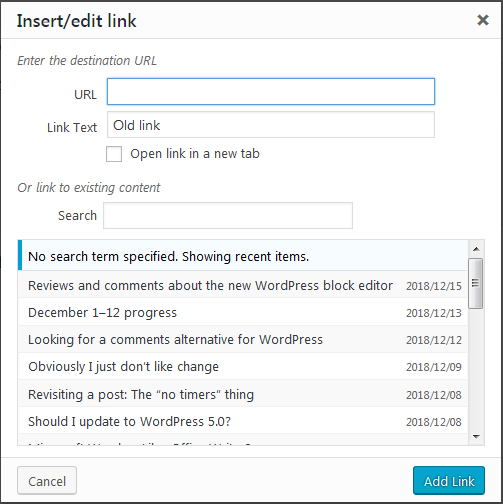
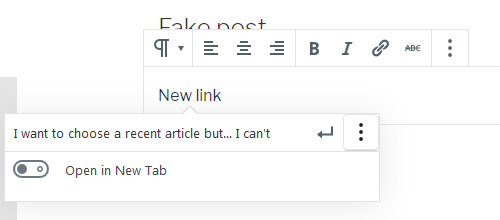
Where’d the link options go in the new WordPress editor?

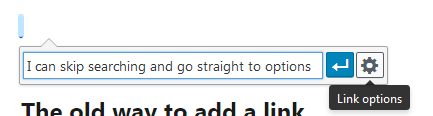
Unless I’m missing something (entirely possible), you can no longer select a post from a list of older content by using the link options when you create or edit a link in the new WordPress editor. You can only search for the content, and if you can’t find it, well, you’d better open another browser window and prepare to hunt it down and get the link that way.

What the hell, WordPress?

The old way to add a link

The new way to add a link

If you’ll notice, the options bring up only the option to open the link in a new tab. You no longer get that helpful list of recent posts.

Blah. Just another way WordPress has degraded on the usability front. I’m just so disappointed with this new version that I’m seriously considering a change back to static HTML websites for the first time in years.

Reviews and comments about the new WordPress block editor

I wrote what I thought about the WordPress 5.0 update and the new block editor in my own previous post.

I’m not satisfied to be unhappy about the change all by my lonesome. So here are some links to other people’s reviews and thoughts about the new editor.

Reviewing Gutenberg: Is WordPress’ New Editor Up to Scratch?

Thorough and to the point. It addresses the topic from a viewpoint I share, but I am totally biased. I don’t like the editor.

Welcoming WordPress 5.0 And The New Editor

Mostly a positive look at WP 5 and the new editor, with a bit of a take-back at the end.

WordPress Gutenberg will be the end of WordPress

This one was written by someone who appears to have had so many of the same feelings I have about WordPress’s new update, Gmail and Google Calendar and their regression to a mobile first interface to the detriment of the desktop environment, etc, that I got sucked into reading lots of stuff there. (Gotta say, the article about the three-foot long erection was probably the highlight of my reading that day.)

7 Reasons to Not Switch to the Gutenberg WordPress Editor

I have a few more links that I want to post but I’ll have to get back to it. They’re on a tablet somewhere and I’m supposed to be writing fiction. Also, I’m hungry and the new WP editor has stolen enough of my time! :)

Update: I’ve switched to the “Disable Gutenberg” plugin instead of the “Classic Editor” plugin.

Update again: I’ve switched back to the “Classic Editor” plugin after noticing a few glitches with the other one. It doesn’t matter in the long run because I’m abandoning WordPress on all my sites that use it. I just don’t like the direction WordPress seems to be headed in and I’ve got other options. :-)

Should I update to WordPress 5.0?

I am torn this morning about whether or not I want to update WordPress to version 5.0. I did the update on a smaller site I have (it has about 3 posts) and it went well. No issues to speak of. I also created a post with the new block editor (which I had already tried it out a little when it was called the Gutenberg plug-in). The post turned out fine.

My problem comes in with the actual editor. It’s a bit of a hassle for me. All the little boxes and blocks flaring to life as my cursor scrolls over them. I like seeing the WYSIWYG version and working in the “Visual” editor while being able to quickly flip to the “Text” editor (really, the code editor), and make whatever changes are needed there.

The new block editor is kind of a mess really. As far as I can tell, you can edit the HTML of each block but you can’t edit it as a whole. So lots of extra steps to move one bit of code to another place in the post compared to how it’s currently done.

Screenshot of options showing how to change from visual editor to code editor

NOPE. I just realized I am wrong about this. (I went to the little site that I updated and checked.)

I can select the code editor and see the entire post as code but the way to get to it is separated from the way to get to the HTML editor for each block.

So a bit of a hassle but not as bad as I feared.

Anyway, I’m just not sure I’m ready to change. Being wrong about the HTML editor doesn’t really change how busy the new block editor feels. And then I do have some sites where I use a custom theme I made myself from scratch. It’s held up really well through the upgrades but I’m kind of scared to try it on this one, because of the new structure.

I’m conflicted and I think my best option in this case is to wait until I’m not. I have a book to write and I’ve only written about 300 words today.

Dealing with issues that might come up because of an update going bad isn’t how I need to spend my day. I have too many websites to update to think nothing will go wrong (and I’ve had that happen often enough for me to know it’s a possibility). I hope it’ll be a seamless update for every one of them; I’ll be planning for it not to be!

Update: Well, I am not that happy with WordPress 5.0. I finally updated on a site with more posts and wrote one that used images and the first thing I found was that dragging and dropping an image once it was settled as a block within a paragraph block, it wasn’t coming out short of deleting and recreating it or going into the code editor and sorting through the junk (oh lord is there a lot of junk in there now) and then cutting and pasting it where I want it. [Yeah, I figured this one out, and let me just say that it was a PITA. I had to go search out the answer online. Make the image center aligned so it became its own block again, then move it above the paragraph you want it to merge into before you choose left or right alignment again. My god. Everything takes more steps in WP5. Even deleting a damn paragraph break takes extra keystrokes before two paragraph blocks will merge into one.]

I kind of think I’m not ever updating on any of my sites that matter to me. In fact, I’m now thinking I might just go back to static sites. Plain old HTML is looking pretty attractive right now. WordPress 5.0, not so much.

Looks like I’ll be stuck with the Classic Editor plug-in on the sites I did update until I make up my mind. One thing I can say for sure: I won’t be using WP5’s block editor as is. It wastes way too much of my time. I don’t write in damn blocks. I write, merge, delete, add, merge, delete, write, add, and shift text all over the place before I’m settled with a post. All those little blocks are meant for short-form writers. They sure as hell aren’t meant for me.

Update (the second): I have installed the 5.0 update (because I like keeping things updated for security reasons), but I did install the Classic Editor plug-in, and I’m going to stick with it. I’ve tried multiple additional posts with the block editor on a few sites as I updated them, and I just have to say that the new block editor is hideously inefficient. I tried to imagine what it would be like once I got used to it, but the sad truth is that it’s just a hassle. The blocks are unwieldy when I just want to do a few paragraphs, a quote, an image, and a quick publish. I won’t be using it. I guess someday I’m going to have to consider going back to static HTML or handwrite my own PHP site. But that worry is for another day!

Some things to keep in mind about using WordPress for your author site

After reading another post in a forum where someone has had a WordPress site hacked, I felt compelled to write this post.

Lots of authors let others set up websites for them and have no clue how they work, and the designer/developer decides to use WordPress to build the site because WordPress makes it easy for inexperienced website owners (authors) to post content and it’s free software.

But WordPress is not that easy to run for an inexperienced user, nor is it a set-it and forget-it solution, and that’s often totally forgotten.

I have a lot of WordPress-based websites and there are some key factors to keeping them safe you need to understand before you let anyone set up a site for you using WordPress.

  1. You’ve got to keep the thing updated. If the person setting up the site isn’t going to be doing that for you, you have to learn how to do this. It’s super important. If you don’t, you’re going to get hacked. Just no way around that.
  2. You need to be able to make backups of the WordPress site and media files on the server and the database that your WordPress site stores your content in. If the person maintaining your site doesn’t do this, you need to do it. Just like with your books, you need backups. Things can happen to databases and files can get corrupted or changed and need to be replaced. You need to be able to make these backups.
  3. You have to stay away from old plug-ins, or any plug-in that isn’t well-maintained. The best bet is to always only use plug-ins you absolutely need and make sure they have a reputation for being safe. There are plug-ins out there that are just back doors for hackers. You have to be careful with plug-ins.
  4. Highly customized and complicated themes are not good choices when the site is being run by an inexperienced WordPress user. WordPress code changes, security flaws get exploited, and depending on a designer/dev for updates and fixes can get really expensive. It’s safest to stick with customized child themes based on common, well-maintained themes, such as the core themes that come with WordPress.
  5. Using the default “admin” username is a big no-no and yet lots of designers/devs still set WordPress up with “admin” as the main user. Don’t let them!
  6. You’ll need to use a long (and I mean really long) password for your username. Brute force attacks are an issue with WordPress so you need a long password.

I’m sure there are even more things to keep in mind if you’re letting someone set up a WordPress site for you, but these are the biggies that come to mind.

If you’re not comfortable with web stuff, using WordPress is not going to be a safe option for your website unless you have a designer/developer you can rely on and you’re not afraid to spend some money making sure things stay updated and safe.

WordPress is great. I love it. But I also know my way around a database, can do some light php coding, and have been building and running websites since 2001. There are definitely costs associated with WordPress-based websites, including real money and time. It’s a trade off. You learn to do a lot of things yourself and save the money, or you save the time and pay.

Anyway, if you ended up here because you’re thinking about letting someone set up a WordPress site for you, I hope this helps you make your decision with your eyes open.

:-)

Moving the goal post on 500 words a day

I am a procrastinator. I think I’ve said that many, many times, and it’s right up there in the site description in case I haven’t.

I’m having trouble restarting my 500 words a day streak, and although I know there are reasons beyond the fact that I just want to procrastinate (there are!), I’ve decided that giving myself the opportunity to procrastinate until I’m too tired to hold me feet to the fire isn’t doing me any favors.

So from now on, my 500 words a day minimum (goal, what-have-you) is due before I have lunch.

I could do with skipping a few meals anyway if I’m being honest. :-o I need to lose some weight and I’m not making progress on that either lately, but that’s a story for another day.

As of right now, it’s 2:03 pm and I have to get my 500 words before I have lunch. I had leftover tacos for breakfast, so it’s taken me a while to even start to get hungry. :-) But now that I am, it’s taken my attention away from the tweaks I was doing on this site’s theme (all done, I hope!) and put it back on the fact that I haven’t started writing today.

Since I want to clock six full hours of timed writing today (or finish my book), I do need to get started sooner rather than later.

Making myself do the 500 words a day minimum by lunch might just be the extra push I need to stop this chronic procrastination thing I’ve got going on.

Side note: One reason I was tweaking my theme is because I wanted to change the back-end font to match the front-end font (the composing area in the admin, specifically), and I figured out how to do it by creating a child theme and changing the editor-style.css.

I LOVE composing in this font (PT Sans). I swear it feels like it makes writing easier. I’m considering making this change in my draft style in Word. Who knows? It might make a difference, and I can use all the help I can get.

Anyway, off to write now, so I can eat when I’m actually hungry and not hours later. I know what to do with this story; I just have to make myself sit down and do it.

Thoughts on WordPress’s new Gutenberg editor

So I ran across mention of WordPress 5.0 and the new editor that’s going to be in it and I was immediately overcome by visions of fear and loathing for something that was sure to ruin a good thing. :-0

Then I followed up on it, downloaded the add-in that’s available (Gutenberg) to give it a test run on one of my websites. :-)

I like it.

I was really surprised by how easy everything was and the clean look of it, and now all that fear and loathing has morphed into something much more like cautious excitement.

My one big reservation about it is how cluttered the text view is now, because it does add in a lot of extraneous (necessary, I’m sure) code to make everything work.

But overall I’m pretty well comfortable with the idea of it, and I look forward to it becoming part of WordPress’s core functionality.

New theme, new theme!

Can you tell I’m excited? I’m so happy to have a new theme for the site. It’s the basic Twenty Seventeen theme, but I really like it. I mean, it’s my favorite of the default WordPress themes to date.

I tried my picture in the header, but it was just too big. I can’t get past the desire to have text above the fold. For some reason, landing on a page that’s just an image really throws me, and I just don’t like it. So no header image, still.

On the other hand, the Visual editor window is so much nicer! I hated Merriweather (the font from Twenty Sixteen). I mean, it was nice to read, but it took up way too much space in the back end when I was trying to compose a post. I’d defaulted to doing all my composing in the Text editor. Now I can use the Visual editor more often again. I love that.

Now, off to put this theme on numerous other websites, because I like it just that much. :D

(Oh my goodness. I just realized I’ve spent 7 hours on this stuff, including a few blogs posts on one of the sites where I updated the theme. It’s 11:25 PM. So there went my plans for more than a few words of writing tonight. I’d better get to it if I don’t want to ruin my streaks.)

WordPress 4.7 has a bug in the editor window

The WordPress 4.7 update went well, but writing a post just became more difficult, because—bug. Possibly several bugs.

The window jitters and moves when trying to delete a space and just generally doesn’t react well to scrolling and other stuff at random times.

The table issue I complained about previously is still there. I can’t delete most tables in the visual editor. Instead, I have to go the text editor window to delete them.

But the jittery window is new, as is the fact that I was trying to delete an empty line while in the visual editor and it kept not deleting and the editor window and right side menu just kept jumping up and down. I had to go to the text editor to delete the blank line and the text editor said all that was there was a non-breaking space.

I’ve turned off the “Enable full-height editor and distraction-free functionality” and things feel a little more stable, but the fact is, the WordPress 4.7 editor has problems.

:D

Another WordPress bug to bug me: I can no longer delete tables in the visual editor

And today I discovered that no matter what I do, I can no longer delete tables in the visual editor of WordPress. This matters because tables that look quite small and should be able to be deleted with a simple highlight and delete are often a pain in the butt to delete in the text editor because the code for tables can be quite long on the page.

I certainly hope this one doesn’t hang around a long time. I absolutely hate having to switch to the text editor every time I need to delete a table. I paste tables into WordPress a lot and I’m grateful that at least I got that functionality back after it disappeared in one the previous WordPress updates. But still…

It’s not the end of the world, by far, but it’s definitely not my favorite thing. :(

WordPress Update 3.9.1 Bug?

Well, the update to WordPress 3.9.1 went fine, but yesterday, shortly thereafter, loading pages in the admin became problematic. About every fourth or fifth click/page load, I end up with nice blank white page. :D

Ah, well, I’m sure it’ll be fixed soon but it’s still a bit annoying. Considering how much this software cost me … oh, wait. I think I’ll shut up now. :D

I love WordPress (most of the time*).

Also, I have no real way of knowing if WordPress is truly the issue so I’m not going to bother with any kind of bug hunting. I have lots of words to write today.***

Just in case, I reinstalled the update because it was a simple click. I love how WordPress has become ever easier to keep updated.

*See link for details.** :D

**I know, I know! But I get a kick out of footnotes and I put them everywhere. I just hate interrupting the flow of my sentences more often than I need to and so … footnote!

***It’s Friday. That kind of definitely makes me sad. Today’s my last day this week for focused writing.


Undoing Mistakes

So, I’ve spent a little time undoing a few mistakes I made. Not that the mistakes were huge or anything. (They really were. I really just don’t want to admit that, even though I now find myself admitting it anyway.)

What have I learned from this?

Static sites are great.

But I still love WordPress.

Getting over mental hurdles is a lot (LOT) harder than it ought to be and therefore I shouldn’t have wasted so much time trying to do so when the alternative was less work.

SO many things I think I’m going to do, I never do.

Writing blog posts is currently more fun than writing fiction. Even though I have a deadline of Friday and today is Wednesday night and I have another 10,000 words to write. Guess I’ll have to cut that ending short. :-o

Crap.


Twenty Twelve Theme

If you haven’t noticed (and I wonder why you would to be honest) I’ve changed from Thesis to WordPress’ own Twenty Twelve theme for this blog. I like Thesis, but it’s become such a hassle to deal with, with the updates and upgrade and the all new back end to learn, and I just couldn’t invest the time. Didn’t want, I should say. So when I realized how much more attractive I found the newest theme from WordPress straight out of the box, I gave it a try, and I must admit, I love it. I don’t need anything too fancy and I’m not a fan of excess images when words are more important to me than pictures most of the time.

I traded out a couple of sites using Thesis for the simpler Twenty Twelve theme and I think it’ll stick. :)

Static Site Hell

I am in static site hell.

So, I got rid of WordPress on so many sites I can’t even count them… I also got rid of a lot of sites, period. Although I do have wide interests and an amazing capacity for picking up domains that I find appealing, I’ve decided I’ll have to forego that in the future. Life is WAY too short to spend it buying domains I’ll never develop. A (not so) short while ago, I bought my last domain for a (long) while.

Getting rid of WordPress isn’t a bad thing IMO. The bad thing is that I actually like discussion and not having WordPress means I have no commenting system on those sites now. Some of them don’t need commenting and that’s great. But some of them are definitely sites I run because I love the topics and those sites? They need commenting because without commenting I feel like I’m missing a huge opportunity to have fun with the sites!

And then there’s the updating. This is a mental block that I’m just going to have to overcome. The fact is, I’ve done the time studies to prove that I can update a static site just as fast as I can update a WordPress run site. Sure, the front-end effort is more time efficient in WordPress when I have a super-short post I want online. But it evens out when the posts get longer and the number of new images increases. I can whip out a formatted block of HTML just as fast as I can type in Word (or OpenOffice Writer when I’m stuck with it instead, no offense to Ooo fans everywhere, because it is a great free program, but dammit, I LIKE Microsoft Word). And when it gets complicated? Handcoded HMTL is unbeatable for customizing on a page by page basis and I can create a complex mini-site within a site with 10% of the effort and time I spend in WordPress trying to get it to do what I want. And I do have sites like that, where I want each section to be unique and have very little use for cookie-cutter pages.

But the problem is that even though I know this, it still feels like more of a chore to add a new article or page and I’ve really let that interfere with my site updating!

Then there’s another issue. When I converted, I kept all the old content, including tag and category pages. I can’t decide if I want to continue to update these (and even expand where appropriate) or just leave them as is and not add the new content to them (seems like a sure way to make the site look out-of-date even when it’s not), or delete them as I decide I don’t need them and convert relevant, useful tags and categories into actual subsections of the site(s). Guh. Over-categorizing just seems like a sure way to end up with a mess.

Maybe I’ll get this all straightened out soon. If not, I’ll just go back to worrying about my spy and not doing anything… ;-)

Peace of Mind is Worth a Thousand HTML Sites

I just turned a bunch of WordPress sites into static html, for a variety of reasons, not the least of which are the following.

  1. Security
  2. Peace of Mind
  3. Ease of Maintenance
  4. Peace of Mind
  5. More Peace of Mind

I love WP, really. However, I also love peace of mind, and I had too many sites using WP to have any peace of mind.

Why? Because although WordPress is great and gives added functionality to a site and makes updating content easy as typing in Word or OpenOffice, it has a bad habit of making my life harder than it has to be.

I want to make a page look a certain way? I need to create a new page template. I want to make a site look a certain way, I need to edit a theme. I want to backup my files, I have to backup files by ftp and export a database. I want to restore a site? I have to upload files, fix or create a database, and pray it all works together the way it was supposed to. Oh, accidentally delete my WP config file and wow, what a mess that new one made of the character encoding! I have freaky symbols everywhere. Ugh!

Then there’s the scary stuff.

I found a few sites where a plugin had opened a backdoor and someone—whoever you are, you are a [bleep]—uploaded some crappy IM type posts for backlinks into a few of my directories.

It was then I decided static html (or even php with basic includes) was my friend and WordPress wasn’t. Sometimes you like something (like swiss rolls) but sometimes you have to give them up because they just aren’t good for you.

I still have my blog and it will stay WordPress because that’s where WordPress works best. But because it’s a simple blog, I have no need of crap plugins or special templates or anything else.